Stoneridge Tachograph Pairing
Pairing the Stoneridge tachograph differs from VDO devices. Below we describe the steps for Bluetooth pairing with a Stoneridge tachograph.
Prerequisites
- ✓The driver card must be inserted in the tachograph
- ✓The tachograph's Bluetooth function must be turned on
- ✓The phone's Bluetooth must be enabled
- ✓The TachoAI application must be open on the phone
Checking whether the tachograph supports Bluetooth
Stoneridge tachographs support Bluetooth from the GEN2 v2 generation onwards. You can check the generation of your device as follows:
- Print a 24-hour or technical list from the tachograph
- At the bottom of the printout, locate the manufacturer header block (Stoneridge Electronics · Örebro)
- Below the manufacturer name you will see the part number, year, and the generation marker (e.g.
GEN2 v2) - If the marker is "GEN2 v2 · V 1619 · 21/12/2023" or newer → the tachograph is Bluetooth-capable and can be paired with the app
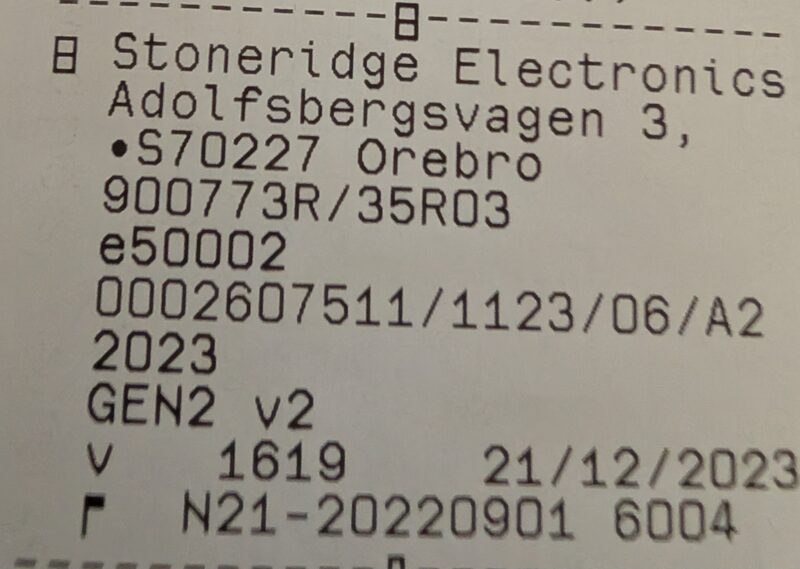
Older Stoneridge tachographs
If the marker is only "GEN2" or "GEN1" — the tachograph does not support Bluetooth communication. In that case, use the Front Device for data download.
Important!
The pairing always applies to the same arrangement of the same driver cards — when driving solo, only to your own card. If a different card is inserted in the tachograph, or if your card is moved to a different slot, the previous pairing must be deleted on both the tachograph and the phone.
The TachoAI and TachoAI app automatically detect nearby tachographs that can be paired, as well as those already paired.
Pairing steps on the Stoneridge tachograph
- Enter the tachograph's main menu
- Navigate to the Bluetooth settings menu item
- Select the "Pair new device" option
- The tachograph will search for available devices
- Select your phone from the list
- Confirm the pairing code on both devices
- Wait until the pairing is successfully completed
Warning!
Similar to VDO tachographs, the pairing is linked to the tachograph AND the driver cards inserted in it. If the cards change, the pairing must be deleted and re-established!
Removing the pairing
If the pairing is not working or the driver cards have changed:
1. Remove from the phone
- Open the phone's Settings menu
- Go to the Bluetooth section
- Find the Stoneridge tachograph name
- Select "Forget device"
2. Remove from the tachograph
- Enter the tachograph's Bluetooth settings menu
- Find the phone name in the list of paired devices
- Select the delete option
Tip
The pairing must be removed on both devices before re-pairing.
If the download doesn't start after pairing
If the download doesn't start after pairing, or the tachograph "doesn't respond": this is usually not a pairing error. See the Troubleshooting → "Tachograph not responding" section. The quickest fix: turn off the ignition, then turn it back on, and try again; make sure the same card(s) are in the tachograph as at pairing time.